
ST
Suganya Thangavel
November 27, 202610 min read

Suganya Thangavel
Procurement is the process of obtaining goods and services from external sources. In Oracle Fusion Cloud, the Procurement module provides a comprehensive solution for managing the entire procure-to-pay (P2P) lifecycle.
Oracle Fusion Procurement is an integrated solution that automates and streamlines the entire procurement process from requisition creation to payment processing. It includes modules for purchasing, supplier management, receiving, invoicing, and payment.
The Procure-to-Pay process consists of the following stages:
| Step | Activity | Description |
|---|---|---|
| 1 | Requisition | User creates a request for goods/services |
| 2 | Approval | Request goes through approval workflow |
| 3 | Purchase Order | Approved requisition becomes PO |
| 4 | Receipt | Goods/services are received |
| 5 | Invoice | Supplier invoice is matched to PO/receipt |
| 6 | Payment | Payment is processed to supplier |
Oracle Fusion Cloud uses a role-based access control system. The following roles are required for implementing and using the P2P process.
| Role Name | Purpose | Key Responsibilities |
|---|---|---|
| Application Implementation Consultant | Setup and configure the application | Configure enterprise structure, security, and core procurement settings |
| Procurement Application Administrator | Manage procurement setup | Configure purchasing options, approval rules, and document types |
| Financial Application Administrator | Manage financial setup | Configure GL accounts, banks, and payment options |
| Security Administrator | Manage user access | Create users, assign roles, and manage data access |
| Role Name | Purpose | Key Responsibilities |
|---|---|---|
| Procurement Requester | Create requisitions | Create and submit purchase requisitions |
| Procurement Buyer | Manage purchasing | Create POs, manage suppliers, process receipts |
| Accounts Payable Manager | Process invoices | Create and validate invoices, manage payments |
| Accounts Payable Specialist | Process payments | Create payments, manage payment files |
| Warehouse Manager | Manage inventory | Receive goods, perform put-away, manage stock |
Oracle Fusion Cloud provides multiple ways to access setup and transaction tasks. This section covers the main navigation paths for P2P configuration.
Navigation Path:
Navigator → Setup and Maintenance → Procurement
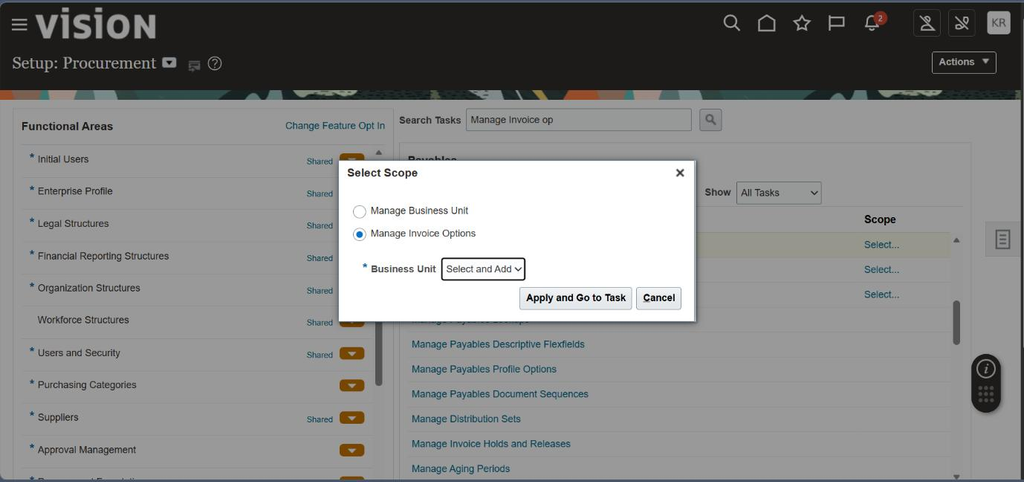
Figure 1: Setup and Maintenance – Selecting Scope for Configuration Tasks.
Navigation Paths:
The enterprise structure forms the foundation of Oracle Fusion Procurement. This section covers the step-by-step configuration of locations, legal entities, and business units.
Navigation Path:
Setup and Maintenance → Enterprise Profile → Manage Locations
Locations represent physical addresses where business activities occur. They are used as ship-to sites, receiving sites, and office sites in the P2P process.
Key Configuration Fields
| Field | Description | Example Value |
|---|---|---|
| Name | Unique identifier for the location | GK_BNG |
| Code | Short code for reference | GK_BNG |
| Location Set | Grouping of locations | Common Set |
| Status | Active or Inactive | Active |
| Ship-to Site | Can receive shipments | Yes |
| Receiving Site | Can perform receiving | Yes |
| Office Site | Office location flag | Yes |
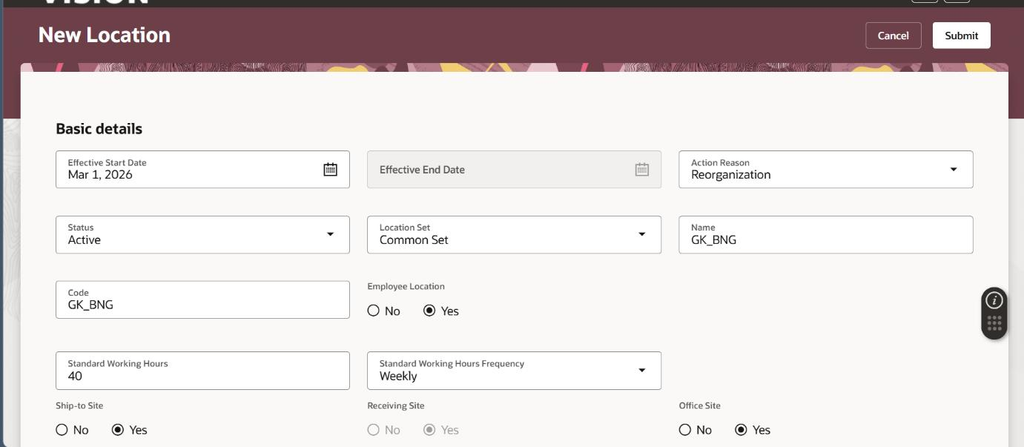
Figure 2: New Location Configuration Screen.
Navigation Path:
Setup and Maintenance → Legal Structures → Manage Legal Entity
Legal entities represent the legal structure of your organization. They are required for financial reporting, tax calculations, and regulatory compliance.
Legal Entity Configuration
| Field | Description | Example Value |
|---|---|---|
| Name | Legal entity name | GK_LE |
| Legal Entity Identifier | Unique identifier | GK_LE |
| Country | Registration country | India |
| Start Date | Effective from date | 3/1/26 |
| Legal Address | Registered address | GK_Legal_Address |
| Place of Registration | City of registration | Bengaluru |
| BE Registration Number | Business entity number | 2345656789 |
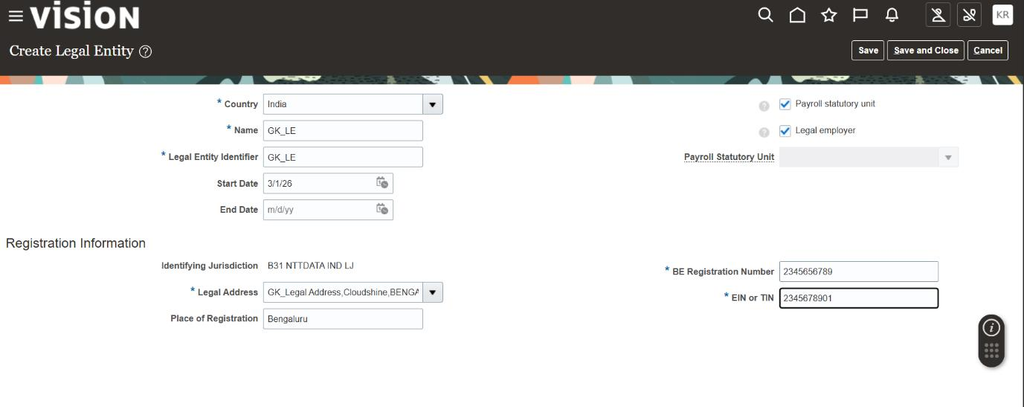
Figure 3: Create Legal Entity Screen.
Navigation Path:
Setup and Maintenance → Organization Structures → Manage Business Unit
Business Units (BUs) are operational units that process transactions. They are associated with a legal entity and location, and define the scope for procurement activities.
Business Unit Setup
| Field | Description | Example Value |
|---|---|---|
| Name | Business unit name | GK_BU |
| Manager | BU manager | KRISH |
| Location | Associated location | GK_BNG |
| Default Set | Reference data set | COMMON |
| Status | Active status | Active |
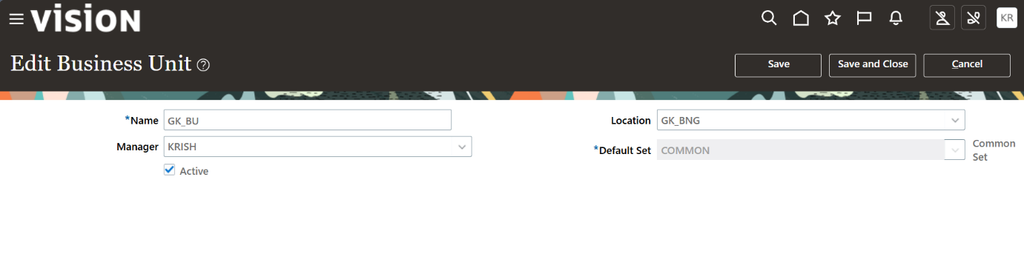
Figure 4: Edit Business Unit Screen.
Inventory organizations are responsible for managing stock items, processing receipts, and fulfilling requisitions.
Navigation Path:
Setup and Maintenance → Organization Structures → Manage Inventory Organization
Inventory Organization Types
| Type | Purpose | Example |
|---|---|---|
| Item Master Organization | Central repository for item definitions | GK_IMO |
| Inventory Organization | Stock management and transactions | GK_INV01, GK_INV02 |
| Storage Subinventory | Storage areas within organization | RAW_MATERIALS, FINISHED_GOODS |
Navigation Path:
Setup and Maintenance → Items → Manage Items → Associations
Items must be associated with inventory organizations before they can be transacted. The Associations tab shows which organizations can use each item.
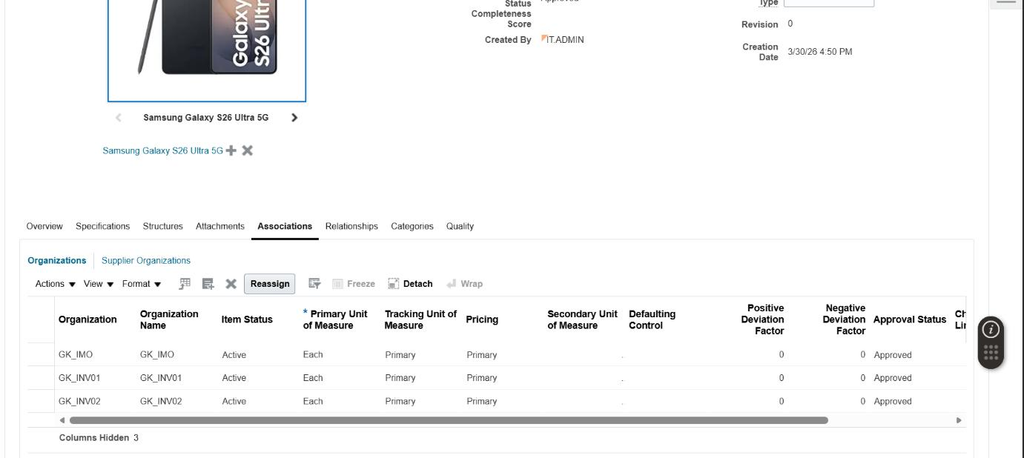
Figure 5: Item Organization Associations.
Sourcing rules determine where stock is obtained from when a requisition is created:
Suppliers are external entities that provide goods and services. This section covers supplier registration, address setup, and service provider relationships.
Navigation Path:
Setup and Maintenance → Suppliers → Register Supplier
Or:
Navigator → Suppliers → Register Supplier
Suppliers can be registered through the Supplier Registration process. This captures essential information including company details, contacts, addresses, and bank account information.
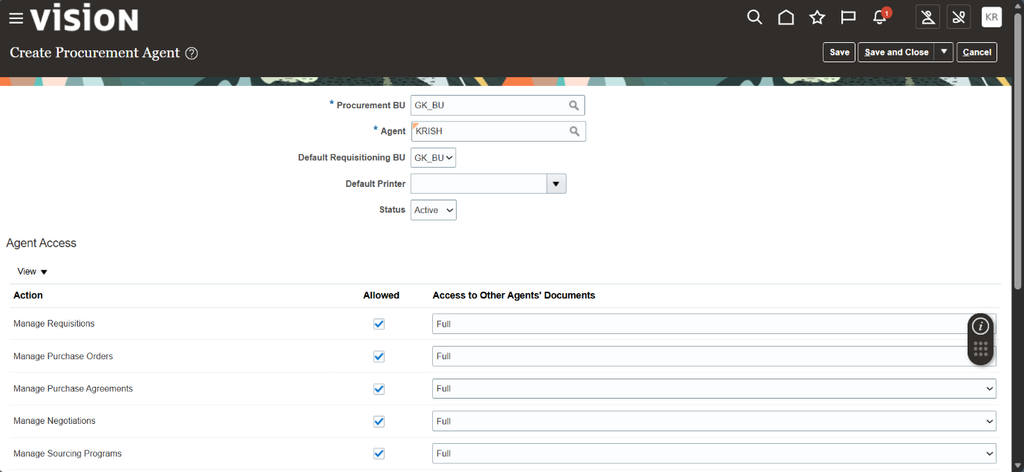
Figure 6: Supplier Registration Screen.
Supplier addresses define where purchase orders are sent and where payments are remitted. Each address can have multiple purposes:
| Purpose | Description |
|---|---|
| Receive Purchase Orders | Address for sending POs |
| Receive Payments | Address for remitting payments |
| Bid on RFQs | Address for quote responses |
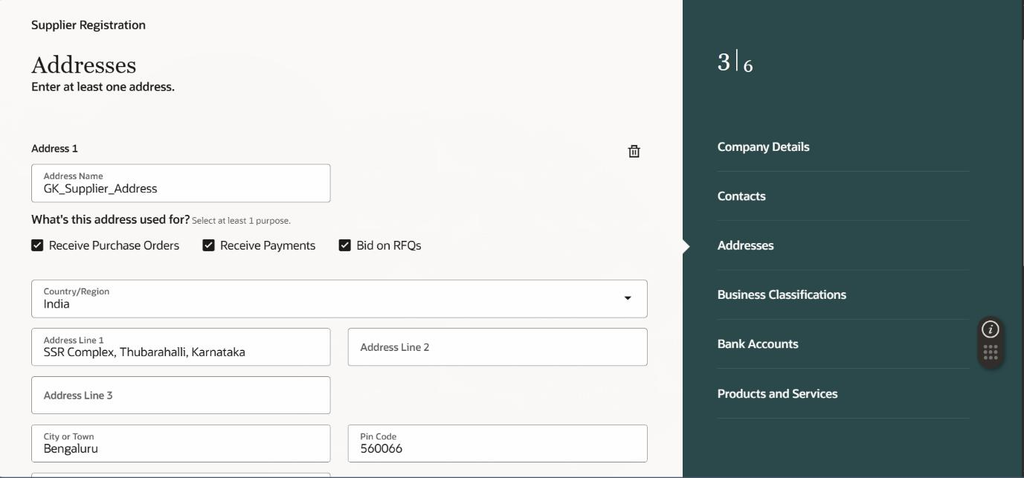
Figure 7: Supplier Registration – Address Configuration.
Navigation Path:
Setup and Maintenance → Suppliers → Manage Service Provider Relationships
Service Provider Relationships define which business units can use specific payment terms and procurement configurations.
Relationship Types
| Section | Purpose | Controls |
|---|---|---|
| Customer Payments Clients | Who can USE this payment term when paying YOU | BUs that can assign terms to customers |
| Payables Payment Clients | Who can USE this payment term when paying SUPPLIERS | BUs that can assign terms to vendor bills |
| Procurement Clients | Who can USE this payment term for PURCHASING | BUs that can use terms in POs |
Requisitions are the starting point of the P2P process. They represent requests for goods or services and must go through an approval workflow.
Navigation Path:
Navigator → Requisitions → Requisition Preferences
Requisition preferences define default values for requisition lines, including requester, deliver-to location, destination type, and charge accounts.
| Field | Description | Example |
|---|---|---|
| Requisitioning BU | Business unit for requisitions | GK_BU |
| Requester | Default requester | KRISH |
| Deliver-to Location | Default delivery location | GK_BNG |
| Destination Type | Expense or Inventory | Expense |
| Project Number | Associated project | GK_PRO01 |
| Charge Account | Accounting distribution | 410.40.22100.000.000.000 |
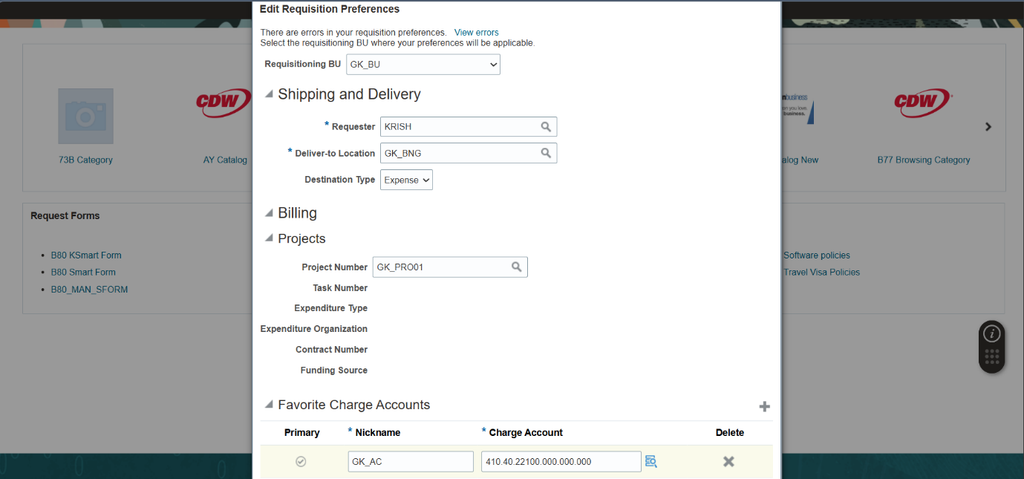
Figure 8: Edit Requisition Preferences.
Navigation Path:
Setup and Maintenance → Approval Management → Manage Requisition Approvals
Approval workflows ensure requisitions are reviewed by appropriate authorities before processing.
Participant Position Options
| Option | Description | When to Use |
|---|---|---|
| Above participant | Manager/supervisor of current approver | Need higher authority |
| Below participant | Subordinate of current approver | Delegate to junior staff |
| Parallel to participant | Same level as current approver | Peer review needed |
| Start of stage | Beginning of approval stage | First approver in sequence |
| End of stage | End of approval stage | Final approver in stage |
Navigation Paths:
For creating requisitions:
Navigator → Requisitions → Create Requisition
For approvers:
Navigator → Requisitions → Approve Requisitions
Once submitted, the requisition goes through the approval workflow. Approved requisitions can be processed into purchase orders.
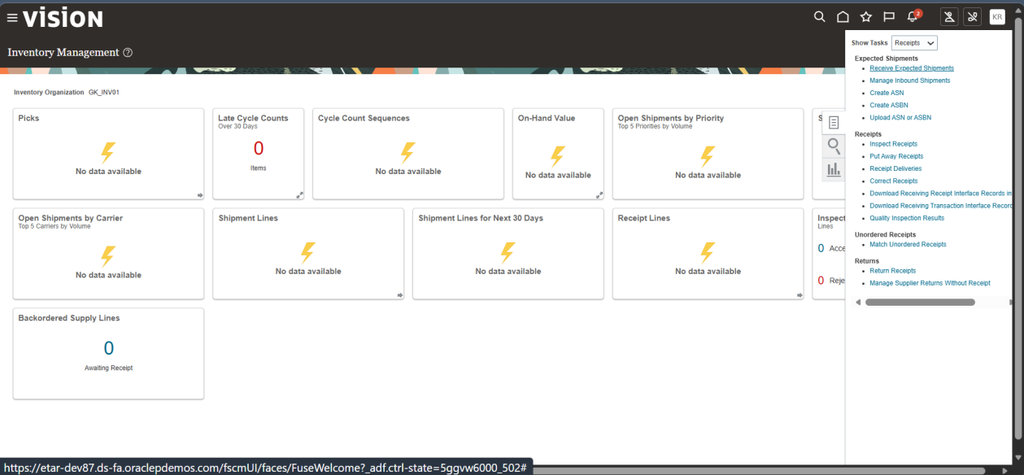
Figure 9: Approved Requisition with Notification.
Purchase Orders (POs) are created from approved requisitions and sent to suppliers to request goods/services.
Navigation Path:
Navigator → Purchase Orders → Create Order
Or:
Navigator → Purchase Orders → Process Requisitions (auto-create PO)
POs can be created manually or automatically from approved requisitions. The PO contains details about the items, quantities, prices, delivery dates, and terms.
PO Key Fields
| Field | Description | Example |
|---|---|---|
| PO Number | Unique identifier | GK_PO01-2026 |
| Supplier | Vendor name | GK_Supplier |
| Supplier Site | Delivery address | GK_Supplier_Address |
| Item | Product/service | Samsung S26 Ultra |
| Quantity | Amount to order | 100 |
| Unit Price | Price per unit | 1200.00 |
| Total Amount | Line total | 120,000.00 |
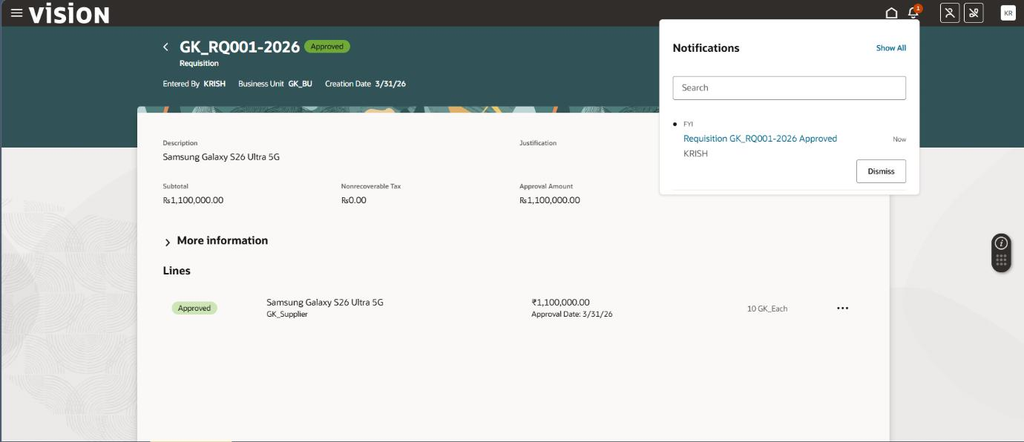
Figure 10: Purchase Order Details.
When goods arrive from suppliers, they must be received into inventory. This section covers the receiving and put-away processes.
Navigation Path:
Navigator → Inventory Management → Receipts → Receive Expected Shipments
The receiving process records the arrival of goods against a purchase order. The system updates inventory quantities and creates receipt records.
Destination Types
| Type | Description | Use Case |
|---|---|---|
| Expense | Item consumed immediately – no inventory tracking | Office supplies, services |
| Receiving | Item goes to inventory – tracked as stock | Raw materials, stock items |
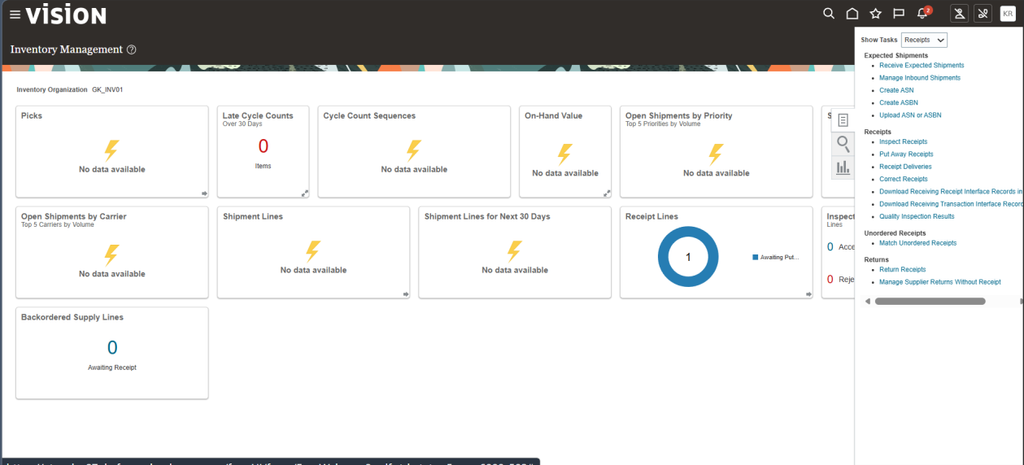
Figure 11: Inventory Management Dashboard.
Navigation Path:
Navigator → Inventory Management → Receipts → Put Away Receipts
Put-away moves received items from the receiving area to their designated storage locations. This updates the subinventory and locator information.
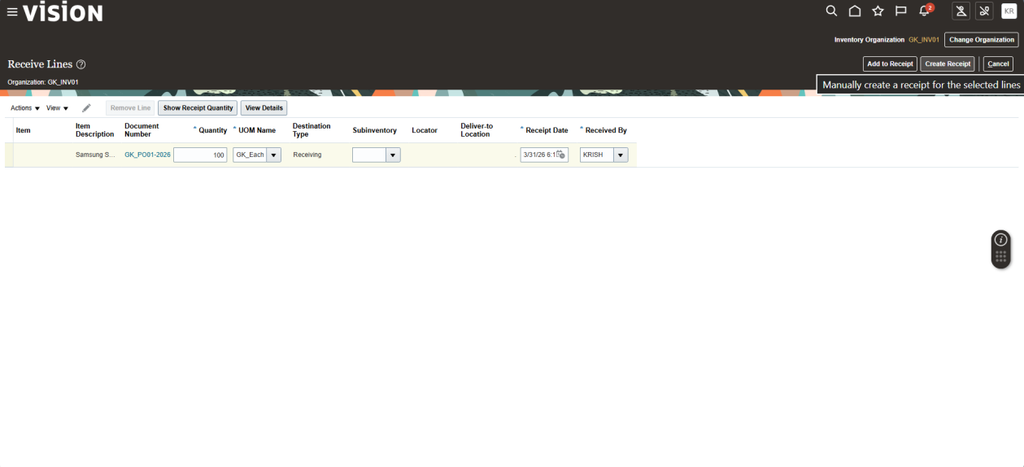
Figure 12: Put Away Receipts Screen.
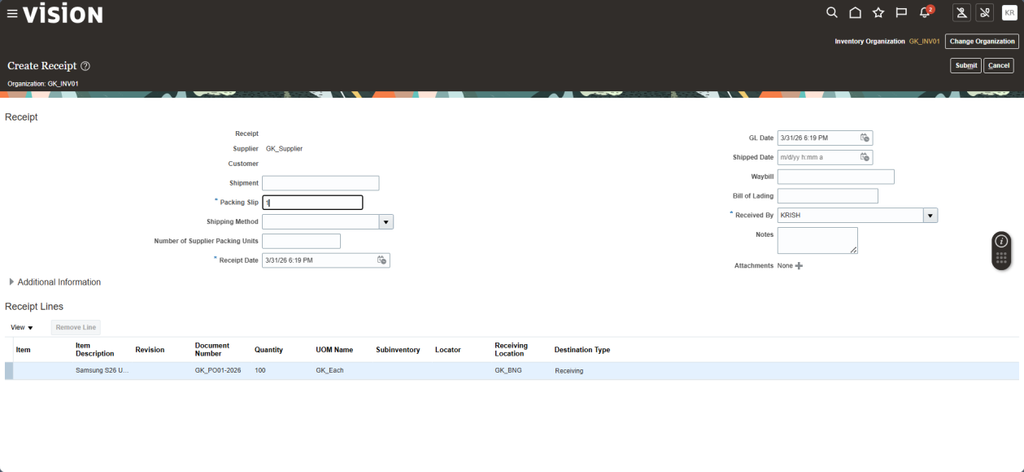
Figure 13: Put Away Lines – Destination Type Selection.
Invoices are created to record supplier charges for goods/services received. They are matched to purchase orders and receipts for validation.
Navigation Path:
Navigator → Payables → Invoices → Create Invoice
Alternatively:
Navigator → Payables → Invoices → Create Invoice (from PO match)
Invoices can be created manually or matched to purchase orders. The matching process validates that invoice quantities and prices match the PO and receipt.
Invoice Key Fields
| Field | Description | Example |
|---|---|---|
| Invoice Number | Supplier invoice number | GK_INV002 |
| Identifying PO | Related purchase order | GK_PO01-2026 |
| Supplier | Vendor name | GK_Supplier |
| Amount | Total invoice amount | 120,000.00 |
| Description | Invoice description | Mobile Phones |
| Payment Terms | Payment conditions | GK_Payment_Terms |
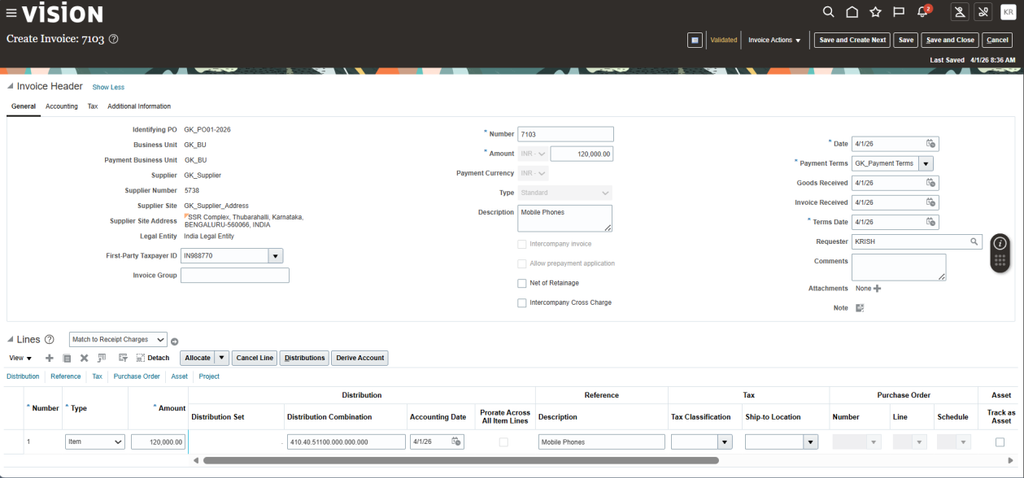
Figure 14: Create Invoice Screen.
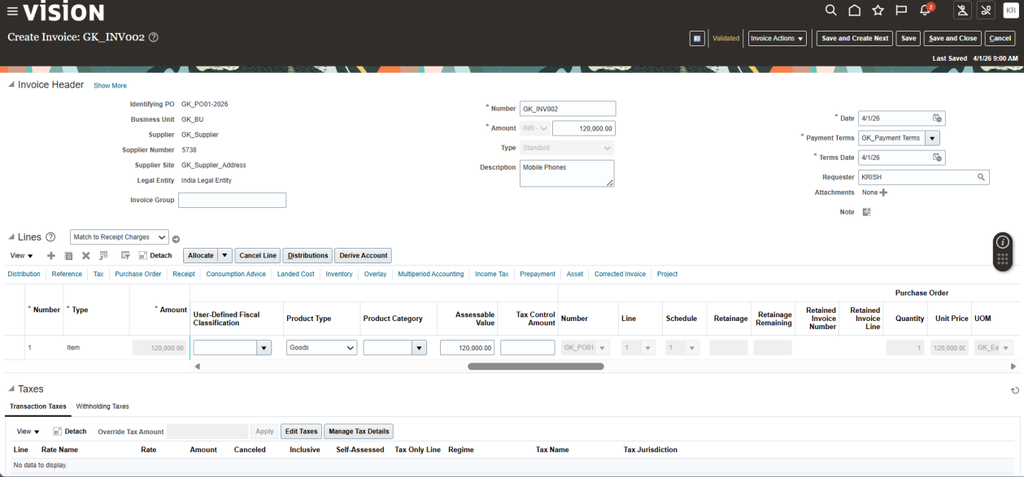
Figure 15: Invoice with Purchase Order Match.
The final step in the P2P process is payment processing. This section covers bank setup, payment process profiles, and payment creation.
Navigation Paths:
Setup and Maintenance → Cash Management → Manage Banks
Setup and Maintenance → Cash Management → Manage Bank Branches
Setup and Maintenance → Cash Management → Manage Bank Accounts
Bank Configuration Steps
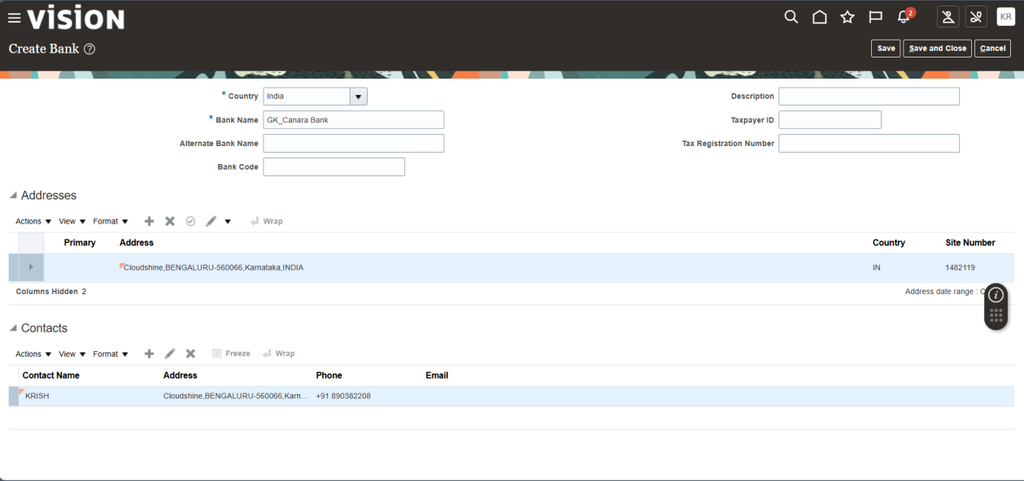
Figure 16: Create Bank Screen.
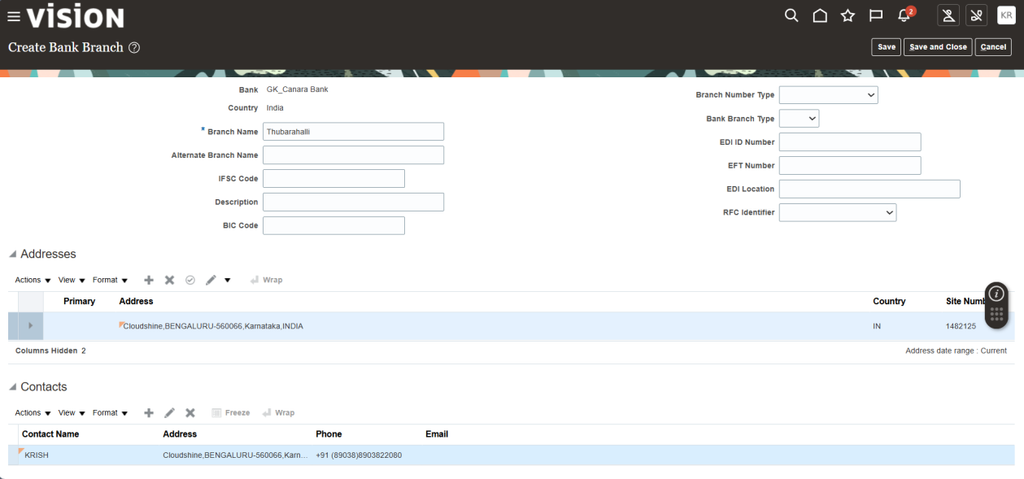
Figure 17: Create Bank Branch Screen.
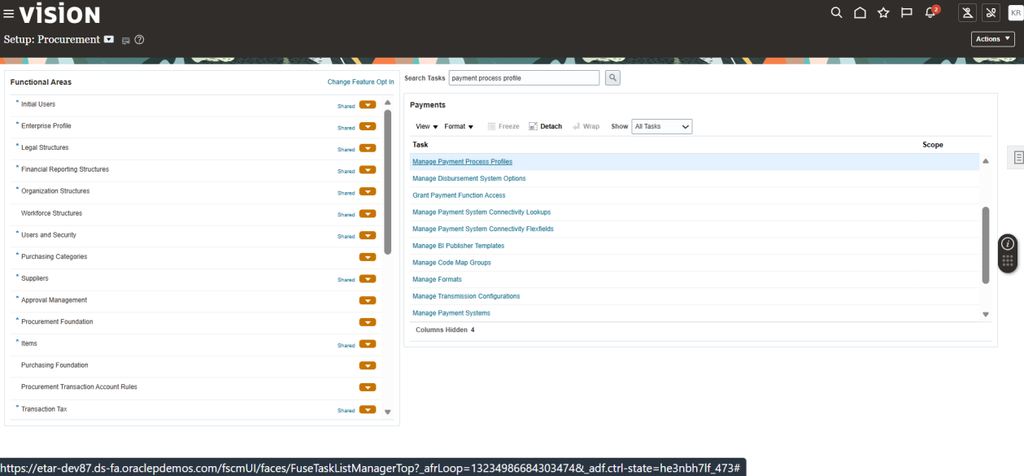
Figure 18: Create Bank Account Screen.
Navigation Path:
Setup and Maintenance → Payments → Manage Payment Process Profiles
Payment Process Profiles define how payments are processed, including payment file formats, payment systems, and transmission methods.
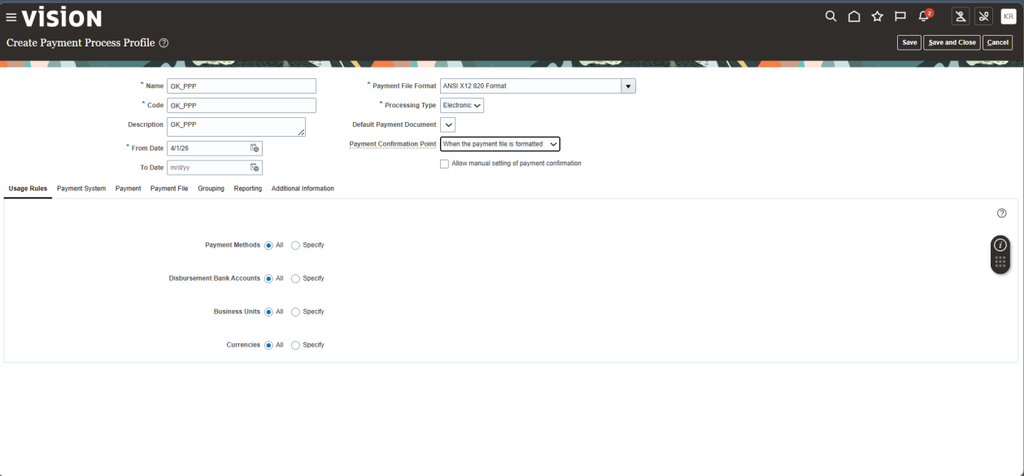
Figure 19: Create Payment Process Profile – Usage Rules.
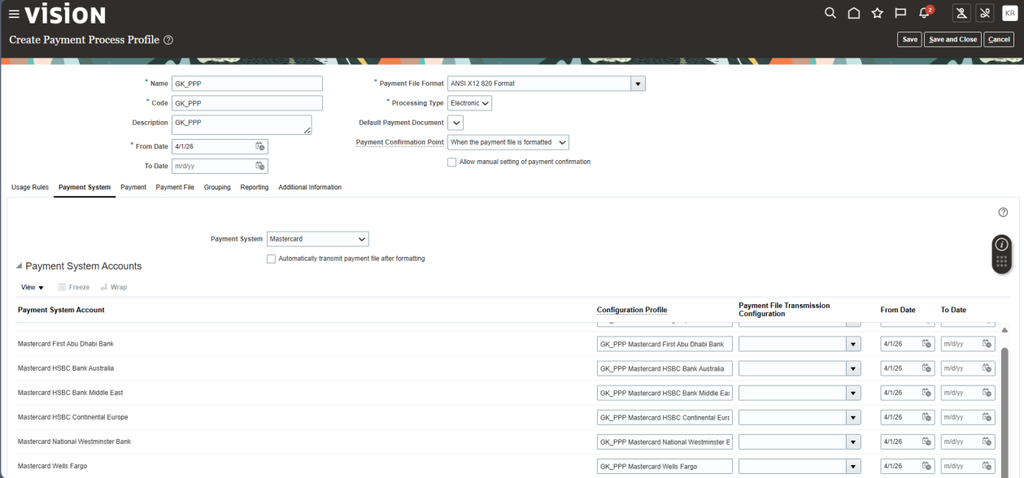
Figure 20: Payment Process Profile – Payment System.
Navigation Paths:
Navigator → Payables → Payments → Create Payment
Navigator → Payables → Payments → Submit Payment Process Request
Payments are created to settle outstanding invoices. The system generates payment files that can be transmitted to banks for processing.
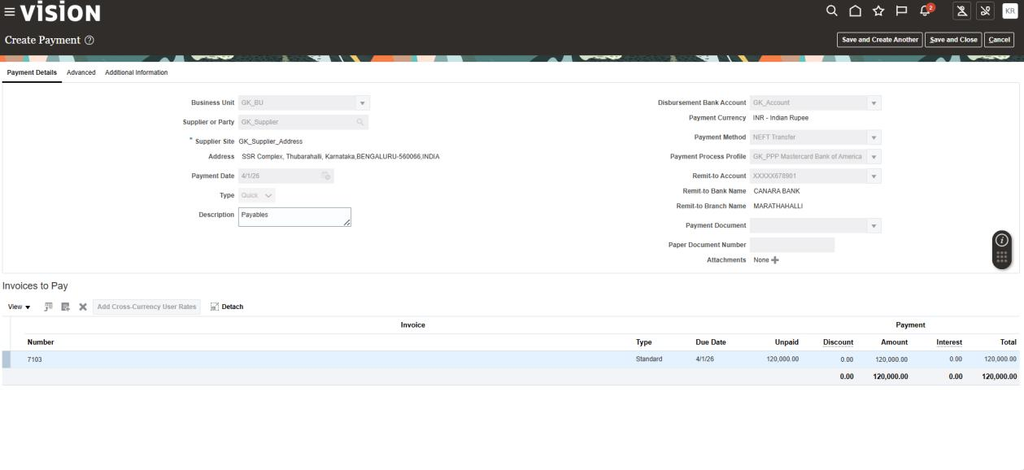
Figure 21: Create Payment Screen.
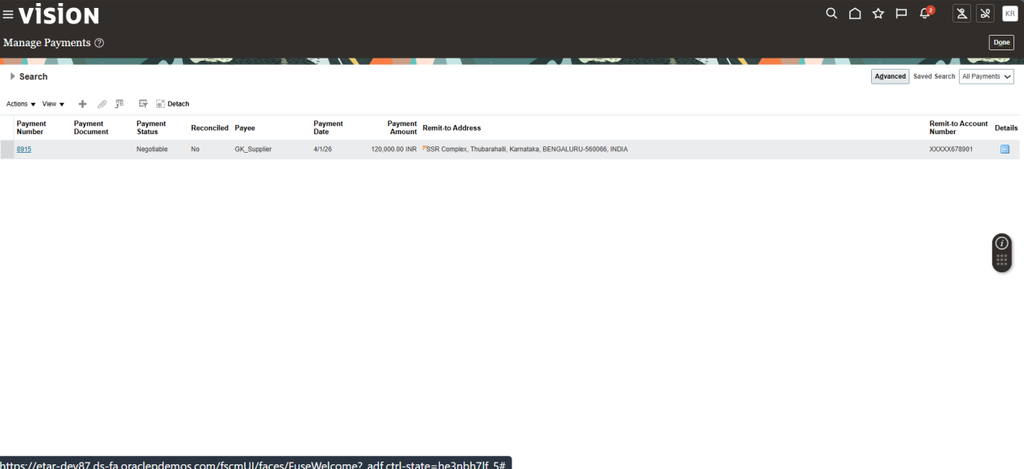
Figure 22: Manage Payments Screen.
This section covers additional procurement configuration options including invoice options, payment options, and data access setup.
Navigation Path:
Setup and Maintenance → Payables → Manage Invoice Options
Invoice options control how invoices are processed, including matching rules, hold options, and accounting date basis.
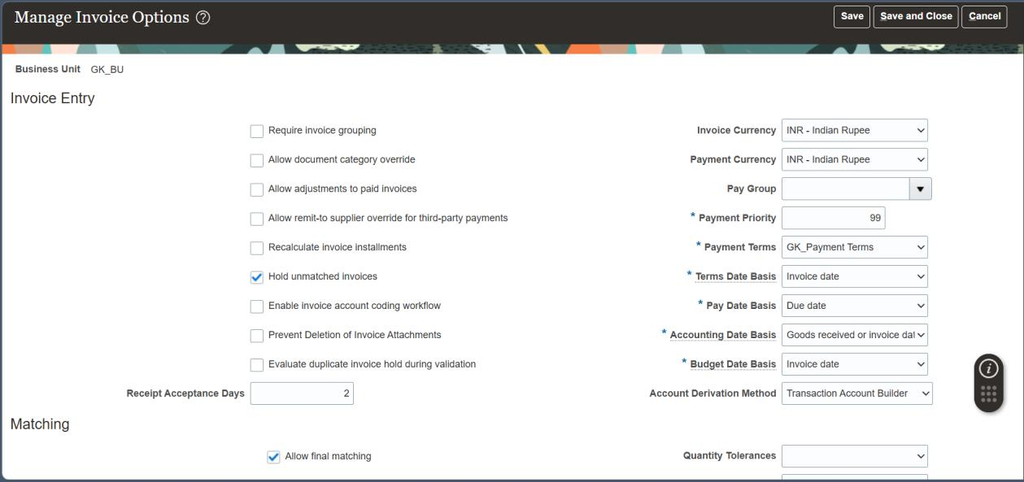
Figure 23: Manage Invoice Options Screen.
Navigation Path:
Setup and Maintenance → Payables → Manage Payment Options
Payment options control how payments are processed, including payment accounting, currency conversion, and bank charges.
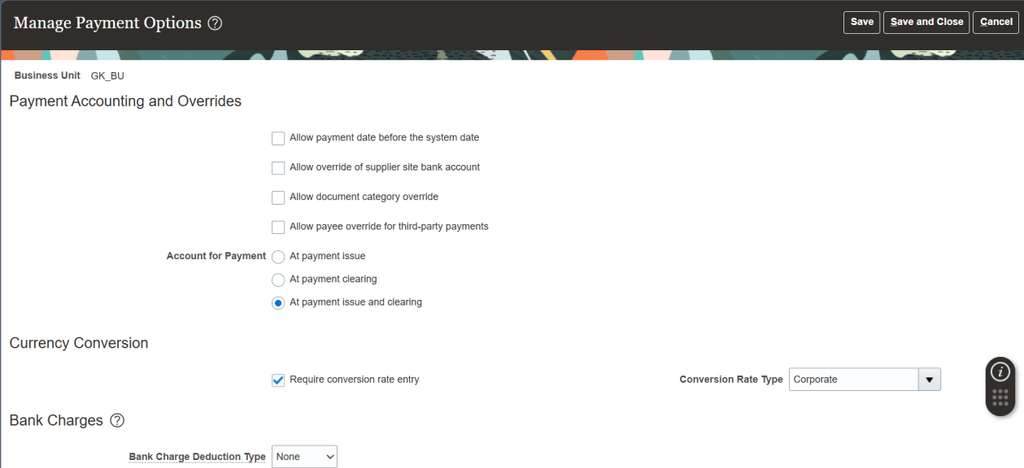
Figure 24: Manage Payment Options Screen.
Navigation Path:
Setup and Maintenance → Users and Security → Manage Data Access for Users
Data access controls which business units users can access for transactions and reporting. This ensures users only see data relevant to their responsibilities.
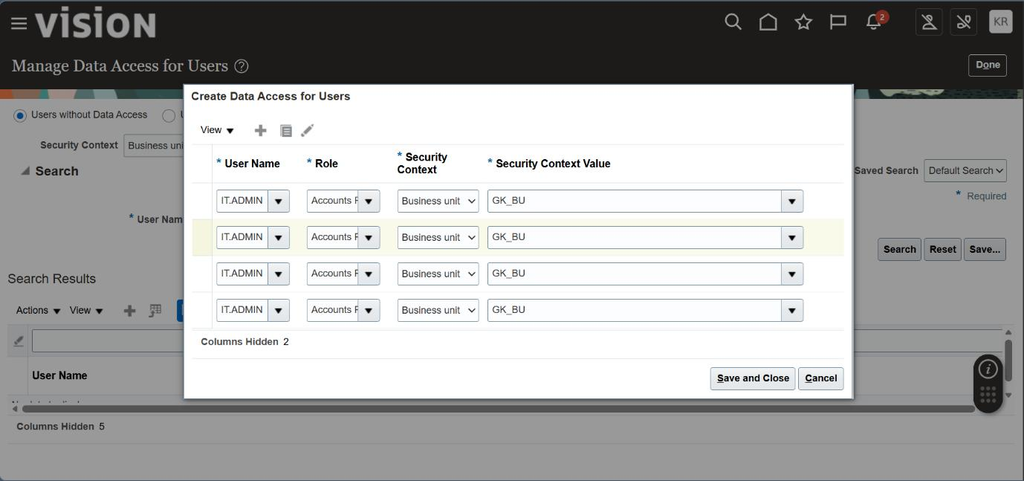
Figure 25: Create Data Access for Users.
This guide has covered the complete end-to-end P2P implementation in Oracle Fusion Cloud. Following these steps will ensure a properly configured procurement system that supports your organization’s purchasing needs from requisition to payment.
Key Success Factors
This completes the Oracle Fusion Procurement P2P Configuration Guide.