Short answer: Choose the learning path that matches your immediate goal. Take a low‑cost Coursera/Udemy intro if you’re confirming interest. If you need certification or corporate credibility, pursue official Workday training and pro tracks. If you want to be interview‑ready within months, pick a hands‑on bootcamp with live tenant access, real labs and placement support. At CloudShine we follow a 60:24 instructor‑to‑lab model plus placement coaching because employers hire experience, not slides.
Quick verdict — pick the right path for your profile
- Beginner / career starter: Start with a Coursera or Udemy basics course to learn navigation and terminology, then add a short bootcamp later.
- Pivoter (IT / HR pro): Choose an intensive bootcamp that includes live instance labs and placement support; add official modules later for certification credits.
- Experienced consultant / corporate upskill: Use official Workday Pro tracks (when eligible) or a premium provider that maps training to certification exams.
- Enterprise buyers / HR teams: Invest in official Workday training for compliance, deep product knowledge and standardized learning paths.
This mapping aligns three variables: learning depth, hands‑on practice, and hiring signals. Concept courses teach what Workday is; official training proves product authority; bootcamps simulate the on‑the‑job experience employers look for.
- Under $300 — take an intro course this week.
- Need a job in 3 months — shortlist bootcamps with live tenant access and placement help.
- Employer requires certification — budget for official Workday Pro tracks and exam fees.
Head‑to‑head: official Workday training vs platform courses vs bootcamps
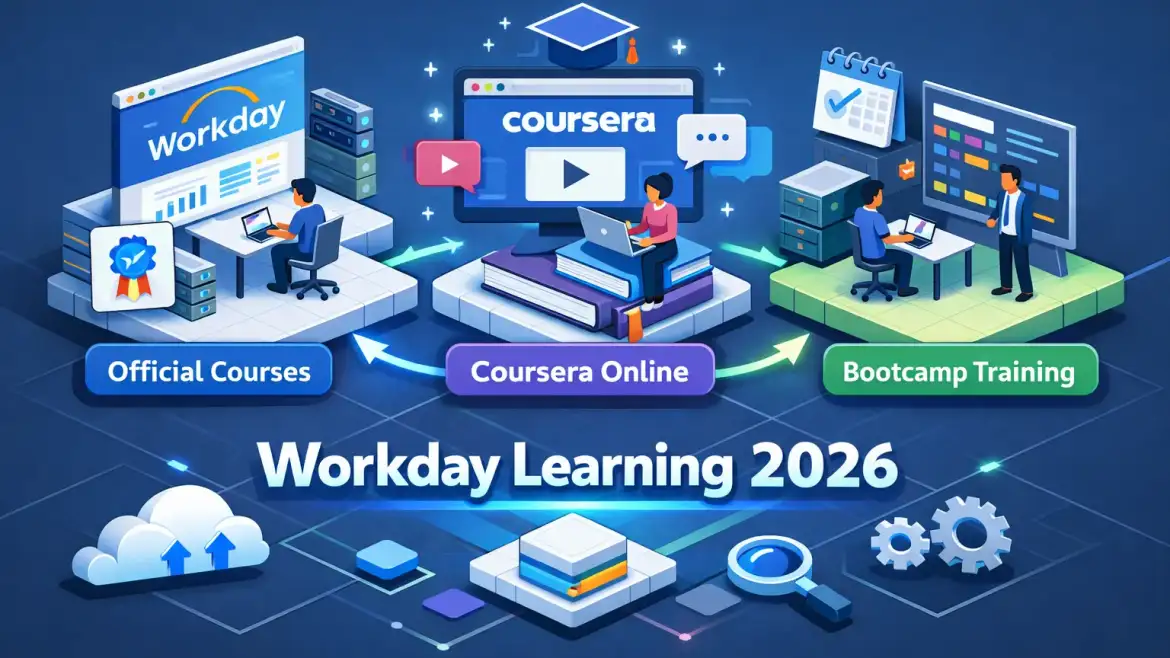
There are three common categories: official Workday education (Workday Learn / Workday Pro), on‑platform courses (Coursera, Udemy, LinkedIn Learning), and third‑party bootcamps (ERP Cloud Training, Online IT Guru, CloudShine). Each has a specific role in a career path. If you’re comparing broader ERP platform approaches as well, see our overview What is Oracle Fusion Cloud and Why Does It Matter for context when moving between systems.
Official Workday training (Workday Learn / Workday Pro)
What it offers: role‑based certification tracks across HCM, Financials, Payroll, Reporting and Platform Administration. Workday Pro tracks are available in virtual, independent, on‑demand or hybrid formats (examples: ~42 hrs virtual, ~47 hrs on‑demand, ~102 hrs independent depending on the track).
Strengths: authoritative content, employer recognition and direct mapping to certification exams. Limitations: higher cost, eligibility and access rules for some exams (often partner or customer sponsored) and limited placement services. For details on official track formats and timelines, review the Workday Pro roadmap.
Price & timing note: official programs commonly run $2,000+ for organized tracks; 2026 exam attempts have been reported around $300–$800 (confirm on Workday Learn).
Platform courses (Coursera, Udemy, LinkedIn Learning)
What they offer: low‑cost, self‑paced videos and modules that introduce navigation, terminology and basic processes. These courses are the fastest way to build conceptual familiarity.
Strengths: affordable and flexible. Limitations: usually no live Workday instance or deep configuration labs, which weakens the hiring signal for implementation roles. If you want a quick, structured starter, consider a beginner course such as the Workday basics course on Coursera before committing to a bootcamp.
Bootcamps / third‑party providers (ERP Cloud Training, Online IT Guru, CloudShine)
What they offer: instructor‑led sessions, live‑tenant or sandbox labs, scenario projects, interview coaching and placement support. Pricing varies widely — some providers price per module (ERP Cloud Training noted ~$549/module), while full bootcamps commonly fall in the $600–$2,500+ range.
Strengths: practical, job‑focused training with portfolio artifacts. Limitations: quality varies — vet lab fidelity and trainer experience carefully. For comparisons of third‑party course options, see this Workday certification courses comparison, and review specific provider offerings such as the Workday HCM course from ERP Cloud Training when evaluating bootcamp syllabi.
| Category | Cost (typical) | Duration | Lab access | Certification & placement |
|---|---|---|---|---|
| Official Workday | $2,000+ | 40–100+ hours (track dependent) | Official demos; sandbox access varies | Direct cert prep; limited placement |
| Coursera / Udemy | $10–$300 | 30–35 hours self‑paced | None (demo videos) | Good for basics; weak hiring signal |
| Bootcamps (3rd party) | $549/module → $600–$2,500+ | 1–8 weeks | Live tenant / sandbox (check hours) | Often includes placement support |
Labs and projects — what real Workday training must give you
Employers expect demonstrable experience: configuring business processes, resolving data issues and delivering reports — not just clicking through screens. A training program that lacks substantive labs will leave you unprepared.
| Module | Essential lab tasks |
|---|---|
| HCM | Create a job requisition → candidate pipeline → offer → onboarding; configure compensation grades and business processes; perform a bulk data load. |
| Finance | Model a chart of accounts, post journals, handle period close tasks, run intercompany entries and build sample financial reports. |
| Payroll | Set up pay groups, process off‑cycle pays, apply tax cases, and integrate time tracking to payroll runs. |
| Analytics / Reporting | Build a custom report, schedule it, create a Prism dataset and design a simple dashboard for headcount or payroll cost analysis. |
Minimum lab expectations: look for at least 20–40 hours of guided, hands‑on labs for basic job‑readiness; serious bootcamps provide 40+ lab hours and downloadable lab guides. Critical features: live instance access, sandbox data, and permission to keep artifacts for your portfolio. If you are coming from an Oracle background and want cross‑reference material on role responsibilities, see our pieces on Oracle Fusion Financial Control & Reporting Important Roles, Oracle Fusion Finance Important Roles, and Oracle Fusion Inventory Management Important Roles for parallel role expectations. For example process mapping related to order flows, review Order to Cash Back to Back Buy Flow, Step 1: Order Creation, CloudShine.
Validate labs during sales/demo — ask these questions:
- Do students get time in a live Workday tenant or just simulated screenshots?
- How many lab hours are included per student, and are those hours guaranteed?
- Can I retain lab outputs (report files, config notes) for my portfolio?
- Do you provide step‑by‑step lab guides and instructor recordings?
- Can I run a sample configuration task during the demo or get a recorded lab to review?
- Who manages the tenant (instructor or vendor) and what’s the uptime SLA?
- Are labs aligned to certification tasks and do you include practice exams?
- What happens if the lab environment is unavailable — refund or extended access?
Cost, time‑to‑complete and certification ROI
Realistic cost brackets: self‑paced basics cost $10–$300; third‑party bootcamps typically cost $600–$2,500+ (some providers list per‑module pricing like $549); official Workday courses and organized tracks commonly start around $2,000 and exam attempts are frequently reported in the $300–$800 range.
Time commitments: a self‑paced basics path is ~30–35 hours. Bootcamps and instructor‑led programs usually run 4–8 weeks depending on intensity. Official Workday Pro tracks can require 40–100+ hours depending on format.
How to think about ROI: if you need interview‑ready skills in 2–4 months, a bootcamp with live labs and placement support usually returns value faster than piecing together self‑study. If your employer will sponsor certification, official training is often worth the premium. If budget is tight, validate interest with a low‑cost course before committing to a bootcamp. For a practical comparison of third‑party offerings and local bootcamps, review the Workday training roadmap and provider comparisons when shortlisting options.
- Budget < $300 → take an intro course and audit your CV.
- Need job in 3 months → choose a bootcamp with guaranteed lab hours and placement coaching.
- Employer requires certification → enroll in official Workday Pro track and confirm exam eligibility.
How to enroll and prepare — checklist and 30/60/90 plans
Enrollment checklist — ask before you pay:
- Do you provide live Workday instance access? How many guaranteed hours?
- What real projects and artifacts are included and can I keep them?
- Trainer credentials and typical batch size?
- What placement support is included (mock interviews, resume review, placement guarantees)?
- Certification prep: practice exams, vouchers, eligibility guidance?
- Refund/deferral policy and sample schedule?
30/60/90 plans (scannable):
Beginner: 0–30 days: finish a Workday basics course and learn navigation + business terms. 31–60 days: complete guided HCM labs and one reporting lab. 61–90 days: finish a small implementation project and 2 mock interviews.
Intermediate (pivoting pro): 0–30 days: module deep dives and process mapping. 31–60 days: configuration labs, integration basics and data loading exercises. 61–90 days: capstone client simulation and certification practice exams.
Advanced / consultant: 0–30 days: focus on integrations and reporting, design patterns. 31–60 days: run end‑to‑end tenant configuration and lead a mock cutover. 61–90 days: client simulation, advanced troubleshooting and interview leadership drills.
How CloudShine fits: CloudShine’s model balances instruction and practice — 60 hours of instructor time paired with 24+ hours of dedicated labs, mentor support and a placement cell that helps with resume building and mock interviews. That structure is designed for pivoters and aspirants who need measurable interview readiness.
First three actions to start today: audit your CV for ERP keywords, schedule a demo with one bootcamp that offers tenant access, and enroll in a short Coursera/Udemy module to confirm interest.
FAQs
Do I need Workday certification to land a job? Not always. Hands‑on experience and demonstrable project artifacts often matter more for hiring managers. Certification strengthens credibility, especially for consulting roles.
How long to get job‑ready? Intensive bootcamps with daily practice can make you interview‑ready in 2–4 months. Self‑paced learners typically need longer and must add labs to the plan.
Can individuals buy official Workday training and exams? Eligibility varies. Many official paths favor Workday customers and partners; check Workday Learn for current rules and exam access.
Which modules are most in demand? HCM (Core + Payroll), Integrations, and Reporting/Analytics consistently show the highest market demand.
Final recommendation: If you’re testing fit cheaply, start with a Coursera/Udemy basics course. If you need a job in three months or are making a career pivot, invest in a reputable bootcamp with live instance access and placement support — CloudShine follows a 60:24 hands‑on model built for that outcome. If certification is a hard requirement at your company, pursue official Workday tracks.
Compare two programs this week: take a free bootcamp demo and review one official module. If you want a job‑focused, live‑instance Workday course with placement coaching, schedule a short consult with CloudShine to build a tailored 30/60/90 plan.