Yes — you can pursue Workday HCM certification as an independent learner, a customer, or through a partner organization; this article lays out a practical six-step roadmap (courses, hands‑on practice, exam details, costs and timeline) so you can start today. Earning a Workday credential shortens the path to HR/consulting roles and demonstrates platform fluency employers pay for. At CloudShine we train consultants with live instance labs and placement support — below I’ll show you how to replicate that path whether you join a bootcamp or self‑study.
Who’s eligible — a quick decision checklist
Most Workday HCM tracks and prep options are available to customers, partners and independent learners via official coursework or third‑party bootcamps. That said, some vendor‑gated exams and advanced tracks are managed through employer relationships (partners or customer accounts) — check access before you pay for a course.
- Do you have employer/partner access to Workday Learning? If yes, you often get direct course and exam enrollment.
- Are you targeting consulting (implementer) roles or admin/analyst positions? Consulting often expects partner affiliation or verified project experience.
- Can you commit 4–8 weeks of focused study? That’s the realistic window for a first certification.
If you’re unsure: reach out to Workday Learning for access questions, enroll in a third‑party prep bootcamp that includes instance labs, or start with Workday Basics free resources to validate interest before investing.
The exact 6‑step path (with realistic timeline)
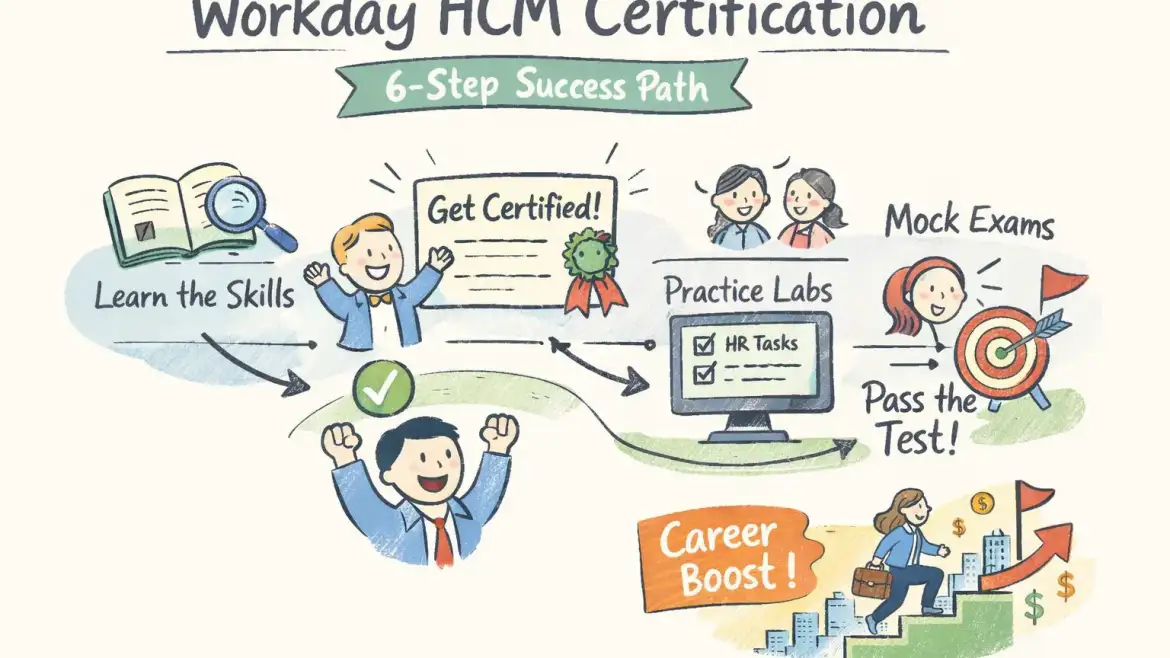
The path is straightforward: pick a track, learn the foundations, take targeted training or a bootcamp, get hands‑on practice, drill with mocks, and sit the proctored exam. Expect 4–8 weeks if you’re new to HCM systems; experienced admins can compress this to 2–4 weeks.
1. Pick the right HCM track and confirm eligibility (1–3 days)
Decide Core vs specialized tracks (Reporting, Payroll, Recruiting). Core is the universal entry point; choose reporting or payroll if you want analyst or payroll specialist roles. Verify whether your employer or the provider gives exam enrollment.
2. Take foundational courses (Workday Basics or equivalent) (1 week)
Workday Basics covers navigation, common business processes, and basic security. This week establishes vocabulary and lets you follow configuration walkthroughs instead of getting lost in UI details.
3. Enroll in HCM Core training or a targeted bootcamp (1–2 weeks)
Instructor‑led sessions teach configuration, business process design, and common implementation patterns. Expect 2–4 live days or 10–20 hours of structured content from reputable providers.
4. Hands‑on practice in a live instance or quality lab (minimum 20–40 hours)
Spend time executing hire‑to‑retire flows, building condition rules, setting security, and writing simple reports. Aim for scenario work (e.g., create an off‑cycle payroll event) rather than passive clicks.
5. Practice tests and weak‑spot drilling (3–7 days)
Take two full timed mocks, mark question types you miss, and do targeted drills on business processes, calculated fields, and security. Simulate the exam environment once or twice.
6. Sit the proctored exam and next steps (day of exam + post‑exam)
Book the proctored slot, follow ID/proctor rules, and plan for quick post‑exam actions: update your resume and notify your network. If you pass, add the certification to LinkedIn and prepare job‑ready bullets showing real‑world scenarios you can support.
Exam specifics: Industry reporting for Workday Pro HCM Core lists roughly 50 multiple‑choice questions, ~100–120 minutes, an ~80% passing threshold, and two attempts (policies change — confirm on Workday’s site). Many learners report a 2‑year recertification cadence for individual certificates; verify current validity with official pages.
| Preparation track | Typical timeline |
|---|---|
| Beginner | 4–8 weeks (foundations + bootcamp + 20–40 hours lab + mocks) |
| Experienced admin | 2–4 weeks (targeted course + focused labs + 1–2 mocks) |
Which HCM tracks exist — pick the right credential
Choosing the right track increases hiring ROI: align the credential to job titles you want to target (HR admin, reporting analyst, payroll specialist, or functional consultant).
HCM Core — Foundational credential for administrators and functional consultants; minimal prereqs and the recommended starting point.
HCM Reporting — For analysts; expects familiarity with calculated fields and basic report writing.
Payroll — Specialized track for payroll config and compliance; requires payroll domain knowledge.
Recruiting / Talent & Performance / Learning / Benefits / Compensation — Module‑specific tracks for HR specialty roles; pick based on the function you want to own.
Integrations / Studio — Technical tracks for integration specialists; requires integration concepts and sometimes Studio exposure.
If this is your first Workday credential, start with HCM Core and add Reporting or Recruiting depending on the role you want to land.
Real costs and training options — how to budget and choose a provider
Be realistic: price depends on whether you use official Workday training, a third‑party bootcamp, and whether live instance access is included. Expect total investments (training + exam prep) in the $1,500–$2,500 range for third‑party programs; exam‑only fees reported in the market run roughly $300–$800.
Official Workday training is typically enterprise‑priced and often free to partner or customer employees; third‑party bootcamps cost less and add placement/mentorship. Exam fees and policies vary by track and region.
When choosing a provider, prioritize: live instance access, trainer experience (real implementers), dedicated lab hours, realistic mock exams, and placement support or resume/mocking services. Also review refund/retake terms before you enroll.
CloudShine spotlight: CloudShine delivers 100% practical labs with live instance access, mentorship from practitioners with 15+ years’ experience, and a placement cell that includes resume building and mock interviews. Choose CloudShine if you need hands‑on instance time plus guided job support rather than theory‑only classes. For readers evaluating cloud platforms side‑by‑side, you may also find useful background in our Oracle Fusion Cloud overview.
Other legitimate vendors include Multisoft Virtual Academy, comparison guides from Online IT Guru, and CloudFoundation’s Workday training — each trades off price, lab depth, and placement services. Match the provider to your budget and the level of support you need. For broader certification mapping and recommended course lists, see an industry guide like the Workday certifications guide.
A practical study plan & exam‑day checklist you can use (week‑by‑week)
This is the “do this” section. Block time and follow the weekly targets below; adjust hours based on experience.
Week 1 — Orientation & basics: Study Workday basics, HR process maps, and navigation; 8–12 hours. Understand terminology and the core business processes.
Week 2 — Core HCM modules: Focus on hire‑to‑retire flows, worker data, and security basics; 12–15 hours. Start small labs recreating hiring and termination scenarios.
Week 3 — Configuration & business processes: Build condition rules, approvals, and transactional flows; 10–15 hours. Create scenarios with parallel approvals and exceptions. If you work across ERP disciplines, reviewing how order and fulfillment cycles are modeled (for example, our order‑to‑cash cycle) can help you understand process orchestration and integrations.
Week 4 — Reporting & practical tasks: Write simple operational reports and calculated fields; 10–12 hours. Practice filtering data and exporting results. For readers with a finance or reporting focus, our piece on financial control & reporting roles illustrates typical responsibilities that map closely to Workday reporting tasks.
Week 5 — Mock exams & practice scenarios: Take two full timed mocks, review errors, and drill weak areas (business processes, report writing).
Week 6 — Exam readiness: Light review, confirm exam logistics, tidy up your resume phrasing to highlight Workday tasks. Prepare for interviews that probe scenario‑based experience.
Daily routine: 1–2 hours on weekdays and two longer practice blocks (4–6 hours) across the weekend; increase lab hours if you lack real Workday access.
- Exam‑day checklist: confirm proctor software, valid photo ID, charged device, stable wired internet if possible, quiet room, and pen/paper for scratch work.
After you pass: add the credential on LinkedIn (certifications section), include 2–3 bullet points showing concrete tasks you can run (e.g., “Configured hire‑to‑retire business process for US employees”), and follow a 30/60/90 plan to apply for roles. If you fail, map missed topics, do a 7–10 day focused re‑study, then rebook.
FAQs & next steps
Can independent learners get Workday HCM certified?
Yes — many tracks and prep routes are accessible to independent learners via official courses (if you have customer/partner access) or third‑party bootcamps that prepare you for the proctored exam. Confirm access requirements for the specific track you want.
How long does it take to prepare?
Typically 4–8 weeks for beginners and 2–4 weeks for experienced admins, assuming 8–15 hours of weekly study plus labs.
How much will it cost?
Expect $1,500–$2,500 for third‑party bootcamps with labs; standalone exam fees reported in the market range from $300–$800. Official enterprise pricing varies.
What does the exam look like?
Workday Pro HCM Core is commonly reported as ~50 multiple‑choice questions with ~100–120 minutes and an ~80% pass score; verify current format on Workday’s certification pages. For practical tips on the certification process and study pathways, see Indeed’s guide on getting Workday HCM certification.
Do I need Workday access for practice?
Strongly recommended. If you don’t have employer access, use vendor labs or CloudShine’s live instance sessions to get the hands‑on experience employers expect. If you’re coming from other ERP backgrounds and want to compare module responsibilities, our posts on Oracle Fusion inventory management roles and self‑service procurement roles show how role responsibilities and hands‑on tasks align across platforms.
Next steps: pick a track, block a 6‑week plan on your calendar, and trial one short lab or module before committing. If you want guided, hands‑on training with placement support, request CloudShine’s Workday HCM bootcamp syllabus or a free consult call to see whether live instance access and mentorship fit your needs. If you’re considering a career change into training roles or simply want another example of a structured certification pathway, review this step‑by‑step guide to becoming a fitness trainer for inspiration on pacing and credential milestones.
Final note: rules and exam formats change. Always verify eligibility, fees, and exam details on Workday’s official certification pages before booking an exam. You can get certified — but only with a practical plan and the right practice environment.